Advanced StrategyQuant Workflow Designs
A practical map of advanced StrategyQuant X workflows, from multi-market robustness funnels and walk-forward factories to portfolio-first selection and AlgoCloud stockpicker systems.

Executive summary
StrategyQuant’s official materials do not present one “correct” workflow. They explicitly describe a standard blueprint—data import, builder configuration, generation, evaluation, retest/optimization, improvement—and then emphasize that traders eventually branch into different paths depending on their goals, markets, and validation philosophy. The highest-leverage takeaway from the sources is that advanced usage is mostly about workflow architecture, not about finding one magical filter. In current official product language, the ecosystem is centered on StrategyQuant X, AlgoCloud, QuantAnalyzer, and QuantDataManager; MT4/MT5 “EAs” are primarily outputs exported from SQX, rather than a separately described product line. As of the latest public download page I found, SQX’s latest listed release was Build 144.2953 on May 20, 2026, so some of the newer patterns below depend on relatively recent builds such as Portfolio Composer, broker profiles, AI-assisted tooling, and the Automatic Retest task. [1]
Across official docs, official blog posts, forum archives, Reddit, and ForexFactory, the strongest recurring pattern is a funnel: generate a very large candidate set, then apply increasingly expensive and more realistic tests—OOS, multi-market or multi-timeframe checks, Monte Carlo perturbations, walk-forward or optimization robustness, portfolio correlation filters, live incubation, and replacement logic. StrategyQuant’s own research blog argues that, in one analyzed forex dataset, multi-market testing appeared to be the most effective robustness test under the chosen settings. Community examples then show very different ways of exploiting that funnel: some traders are heavy users of Walk-Forward Matrix; others skip it and prefer simpler metrics plus aggressive automation; still others organize the whole process around portfolio correlation from the start. [2]
The most interesting specialized workflows fall into five families. First, a multi-market robustness funnel that treats cross-market survival as the main edge test. Second, a walk-forward reoptimization factory built to discover strategies that can be periodically re-tuned. Third, a custom-project overnight mining conveyor that loops automatically until a final databank is filled. Fourth, a portfolio-first complement-and-weight workflow that selects strategies by portfolio contribution rather than stand-alone beauty. Fifth, an AlgoCloud stockpicker factory where the unit of analysis is a broker-constrained stock universe rather than a single symbol. Each of these is practical inside StrategyQuant because custom projects can chain tasks, use multiple databanks, retest into target databanks, loop based on conditions, and keep running until enough candidates survive. [3]
The big caution is that almost every spectacular result in the community is still vulnerable to data-snooping and backtest overfitting. White’s “Reality Check” formalized the danger of repeated rule-search over the same data, and Bailey et al. later proposed a direct framework for estimating the probability of backtest overfitting. StrategyQuant’s own pages repeatedly warn that hypothetical performance differs from live trading, and some of the strongest community claims are explicitly flagged by their own authors as preliminary or potentially contaminated by bias. So the right way to read the workflows below is: use them as process templates, not as promises of profitability. [4]
What changes when a StrategyQuant workflow becomes advanced
An advanced StrategyQuant workflow is usually distinguished by six design decisions. The first is data realism: not just importing data, but matching spreads, sessions, broker conventions, and instrument availability. Official docs say SQX can import data or download it directly; broker profiles introduced in Build 141 let users align symbol settings, time zones, sessions, and stock universes with a target broker; and the FAQ explicitly notes that backtest differences versus MetaTrader are often explained by different data or settings. Community practitioners reinforce this by deliberately using worse-than-observed spreads during generation to avoid unrealistic optimism. [5]
The second is search-space control. Official builder docs recommend keeping strategy structure tighter than many beginners do: small shift values, moderate indicator periods, and deliberate choices about single-chart versus multi-timeframe/multi-symbol strategies. SQX’s own docs recommend keeping shift ranges small—about 0 to 5 bars—and indicator periods ideally below 100, often below 50. The platform also allows long-only, short-only, symmetrical, non-symmetrical, multi-TF, multi-symbol, template-based, and “improve existing strategy” modes, which means “workflow design” is partly the art of deciding what the generator is allowed to imagine in the first place. Independent SQX blog research on 1.2 million FX strategies also found that lower complexity was associated with better walk-forward median outcomes in that dataset, and the author recommends keeping entry/exit rule counts low. [6]
The third is evolution management. SQX’s genetic settings page gives relatively clear operational ranges: roughly 5–100 generations, 10–100+ population size per island, and 1–10 islands; it also notes that too many generations often help less than simply restarting evolution, and that higher mutation can increase diversity. Mark Fric’s official EURUSD workflow example used a population of 200, evolved over 30 generations, then restarted from scratch, specifically to avoid getting trapped in a dead end while still continually storing the best survivors to the databank. That is an important advanced pattern: use evolution for breadth plus improvement, but reset it often enough to prevent local over-specialization. [7]
The fourth is graduated robustness testing. StrategyQuant distinguishes cheap robustness checks from expensive ones. Monte Carlo trade manipulation is fast because it works on existing trade lists; Monte Carlo retest methods are expensive because every simulation requires a full retest. Official docs also emphasize OOS testing, multi-market testing, Optimization Profile/SPP, Walk-Forward Optimization, and Walk-Forward Matrix. In practice, advanced users combine these in a cost-aware order: quick rankers and filters first, expensive simulations later. Community examples differ on which expensive tests matter most—James leans heavily on Walk-Forward Matrix and portfolio correlation; Petr Kouba says he often skips WFM and even SPP; Hani Hamdan uses OOS, multi-timeframe, multi-market, four Monte Carlo simulation types, and sometimes walk-forward. [8]
The fifth is portfolio-aware selection. Official ranking docs recommend computing fitness from the portfolio result rather than only the primary backtest when additional data are used. Fit-to-existing-portfolio can compute fitness using the effect of a new strategy on an existing portfolio and can dismiss candidates whose correlation with the current portfolio exceeds a threshold. Portfolio Master can brute-force or genetically search combinations; sectors can cap exposure to one symbol or sector; Portfolio Composer, introduced in Build 141, goes further by optimizing weights, not just inclusion/exclusion. In short: advanced SQX usage increasingly treats the strategy as a component in a larger machine, not as a stand-alone artifact. [9]
The sixth is deployment and monitoring automation. Official docs and blog posts show several ways to operationalize this: Custom Projects can loop until the final databank reaches a target count; Automatic Retest can flow strategies from a source databank into a target databank across symbol/timeframe combinations; QuantAnalyzer’s Compare Results module can bulk-compare live reports against SQ backtests; and recent blog guidance shows browser-based remote control from a workstation or dedicated server, with explicit security cautions against exposing the feature directly to the public internet. Advanced workflows therefore do not stop at “find a system”; they include live incubation, replacement rules, periodic retesting, portfolio drift control, and remote operations. [10]
Specialized workflow designs
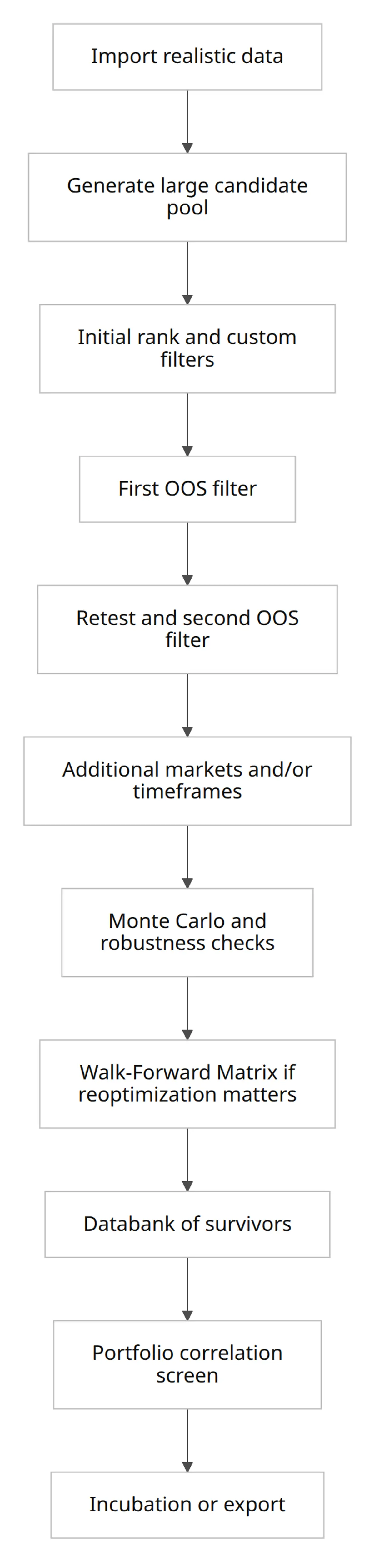
Multi-market robustness funnel. This is the closest thing to an official “serious trader” baseline. Mark Fric’s EURUSD workflow builds a large candidate pool, applies a first OOS filter, retests, applies a second OOS check, tests on GBPUSD as an additional market, then applies robustness tests and finally a Walk-Forward Matrix check. In the same general direction, StrategyQuant’s later robustness-analysis article says that, in its examined forex sample, testing on multiple markets looked like the most effective robustness test among those studied. The design logic is simple: if a strategy only shines on one symbol-history slice, it is suspect; if it degrades gracefully across adjacent or economically related markets, it may be less path-dependent. [11]

A practical implementation inside SQX is to use portfolio-based fitness when additional markets are attached, because official ranking docs recommend portfolio fitness in that situation. Typical parameter tendencies from official docs and examples are: modest search-space complexity, small shift range, indicator periods below 50–100, and enough trades to avoid flimsy statistical significance. The expected outcome is very low pass rates but cleaner survivors. The downside is that good single-market edges can be thrown away if the “additional markets” are badly chosen or structurally different from the intended execution venue. A related pitfall is broker mismatch: if you intend to trade on a broker with different sessions, point values, or stock availability, broker profiles should be part of the front end of the workflow. [12]
Walk-forward reoptimization factory. This workflow is for traders who believe certain strategies should be re-tuned periodically rather than traded “as built” forever. Official docs explain that Walk-Forward Optimization simulates periodic reoptimization, while Walk-Forward Matrix tests multiple combinations of number of runs and OOS percentages. The official example uses runs such as 5, 7, 9, 11, 13, 15 and OOS values of 20, 30, 40, and recommends interpreting the matrix as a surface: robust candidates should show gradual behavior and a cluster of successful combinations rather than a single isolated peak. The docs even suggest a rule of thumb: look for a 3×3 cluster with at least 7 of 9 successful single WF tests. James’s official interview provides a hands-on version of this: he builds long-only or short-only strategies, uses 80% IS / 20% OOS, applies Walk-Forward Matrix, then feeds resulting variants into QuantAnalyzer and Portfolio Master, using monthly P/L correlation ≤ 0.4, and finally deploys winners to an incubation account with explicit replace-or-reoptimize rules. [13]

Typical parameter choices here are more workflow-specific than universal. Official docs recommend 5–100 generations in genetic mode, but for WFM the more important parameters are matrix breadth and optimization cost. Since WFM can be extremely time-consuming, official docs note that the Simulation mode can make WFO or WFM 10–100× faster. James’s workflow also contains two understated but very useful design tricks: he builds using higher-than-observed spreads and he often separates long and short generation because market behavior differs by direction. The main benefit of this workflow is that it gives you an explicit operational answer to “when would I re-tune or retire this strategy?” The main risks are computational cost, parameter-management complexity, and the fact that some experienced users—Petr Kouba among them—believe WFM is not essential for their process. [14]
Custom-project overnight mining conveyor. This is the archetypal “industrialized SQX” workflow. Official custom-project docs say you can chain tasks such as Builder, Retest, WF Matrix, filtering, saving, looping, and notifications; use multiple databanks; and add a Go To Task condition so the project repeats until the final databank reaches a target count. Official examples describe workflows like “build 1000 strategies, retest on one market, retest survivors on a second market, then run WFM on the rest,” and the product team says the goal is to automate virtually every workflow idea. Official blog posts also quote users running automated searches across as many as 20 markets at once. [15]

The most famous public example is the 2019 “100% automated and 100% accurate” custom-project claim published on the StrategyQuant forum and mirrored on Coensio. The author defined “100% automated” as pushing one button before bed and waking up to strategies that had already been generated, validated, and selected; and “100% accurate” as roughly 50 selected systems that were all profitable in subsequent two-year simulated forward periods from two historical starting dates. But the same author also explicitly warned that the result was preliminary, might contain an undiscovered bug, or might still be affected by data-mining bias; he also noted that no portfolio analysis had been done, so correlation risk remained. That combination—ambitious automation plus healthy paranoia—is exactly how this workflow should be understood. Done well, it saves enormous manual time. Done badly, it lets you industrialize your mistakes at machine speed. [16]
Portfolio-first complement-and-weight workflow. In this design, generation is organized around the portfolio from the very beginning. Official Fit-to-existing-portfolio functionality lets SQX compute candidate fitness from the combined portfolio rather than the candidate alone, and dismisses newly generated strategies whose correlation to any strategy in the existing portfolio is above a threshold. Portfolio Master/Automatic Portfolio Builder then searches for the best subset, sectors can cap per-symbol concentration, and Portfolio Composer automates strategy weighting using efficient-frontier concepts. StrategyQuant’s automatic portfolio construction docs show examples using Sharpe Ratio, Return/Drawdown, CAGR vs Max Drawdown, and CAGR vs Average Drawdown, as well as 500 or 1000 simulations for automatic computation. This is the most institutionally flavored SQX workflow in the official material. [17]

James’s official interview is a concrete community implementation of this idea: after WFM triage he runs everything through Portfolio Master and targets monthly profit/loss correlation ≤ 0.4, then deploys many small-risk strategies rather than a few large-risk ones. Hani Hamdan’s recent interview describes an even more automated variant with a first-stage correlation cutoff above 0.3 removed during generation, then a second layer where only four or five strategies are periodically selected out of a much larger cluster for a given instrument family; he uses monthly correlation as the working period. Official docs also explain that Portfolio Composer addresses a different question from Portfolio Master: not only “which strategies belong” but also “with what weight should each be traded.” The benefit is better diversification and capital efficiency. The pitfall is that portfolio optimization can itself become another overfitting surface, so the final result still needs live incubation and drift monitoring. [18]
AlgoCloud stockpicker factory. This is the most distinct workflow because the engine is different. StrategyQuant’s AlgoCloud materials describe automated stock-picking strategies over 500+ symbols in MetaTrader 5, with cloud-style execution and no VPS requirement for the final live deployment. But official docs are very clear that Stockpicker backtesting is not the same as single-asset backtesting: it uses daily OHLC, cannot use minute or tick data, and has unavoidable intraday ambiguity when multiple stop/limit levels could be touched within a single bar. Broker profiles matter even more here because they can restrict the stock universe to the symbols your broker actually supports. Official automatic portfolio construction guidance for AlgoCloud Stockpicker recommends leverage = 1 and uses $25,000 initial capital as a starting point for optimization. [19]

This workflow is especially interesting because it is naturally portfolio-native: each strategy may trade many instruments, so weighting and capital efficiency are central rather than optional. StrategyQuant’s recent blog/interview material also points toward live implementations where multiple robust strategies built in SQX are then deployed on AlgoCloud, and newer build notes say the AlgoCloud engine received enhanced robustness features and more realistic backtesting behavior. The upside is much broader opportunity capture than single-pair or single-futures workflows. The downside is that Stockpicker requires accepting the information loss of daily-bar testing, so intraday precision ideas simply do not belong in this factory. [20]
Comparison of workflows and resources
The table below compares the main workflow families using official documentation plus community examples. “Expected outcome” means the type of output the workflow is designed to produce, not any promise of trading profit. Official SQ pages repeatedly warn that hypothetical results differ from live trading. [21]
| Workflow pattern | Best use case | Core SQ features | Typical resources | Expected outcome | Primary evidence |
|---|---|---|---|---|---|
| Multi-market robustness funnel | Single-asset systems where transferability matters | Additional markets, portfolio fitness, OOS, Monte Carlo, optional WFM | Moderate to high CPU; multiple related markets; hours to days | Fewer survivors, but survivors are deliberately cross-market tolerant | [22] |
| Walk-forward reoptimization factory | Strategies intended for scheduled re-tuning | Optimizer, WFO, WFM, QuantAnalyzer, Portfolio Master | High CPU; optimization-heavy; WFM can be very time-consuming, though Simulation speeds it up | Survivors with explicit reoptimization cadence and better operational retirement rules | [23] |
| Custom-project overnight mining conveyor | Traders who want repeatable unattended research | Custom Projects, multiple databanks, Go To Task, Retest, Auto Retest, Save/Export | High CPU if looping; many symbols/timeframes; overnight-to-multi-day jobs | Automated production of validated candidates into final databanks | [24] |
| Portfolio-first complement-and-weight workflow | Multi-strategy books, capital-constrained trading | Fit-to-existing-portfolio, Portfolio Master, sectors, Portfolio Composer | Moderate to high CPU; requires existing strategy library and correlation data | Better diversification, better weighting, better capital allocation | [25] |
| AlgoCloud stockpicker factory | Multi-stock/ETF strategies and broker-constrained universes | Broker profiles, StockPicker engine, Portfolio Composer, AlgoCloud deployment | High data breadth; daily OHLC only; optimization slower because each strategy spans many instruments | Weighted multi-instrument portfolios suited to stock-picking automation | [19] |
A second comparison concerns parameter tendencies. These are not universal defaults; they are the ranges and example settings most often defended in the sources. [26]
| Component | Official or community tendency | Why it appears useful |
|---|---|---|
| Genetic generations | Often 5-100; official docs say restarting evolution can be better than running too many generations | Avoids wasting time polishing a dead-end population [27] |
| Population size | Often 10-100+ per island | Balances exploration against runtime and memory [27] |
| Islands | Often 1-10 | Encourages diversity without exploding total population size [27] |
| Shift range | Keep small, roughly 0-5 | Reduces weak “deep-past” dependencies that often smell curve-fit [28] |
| Indicator periods | Ideally below 100, often below 50 | Limits overly slow and over-parameterized rule structures [29] |
| OOS split | 80/20 is a common practical example | Leaves enough IS for learning and enough OOS for damage detection [30] |
| WFM grid | Runs around 5-15, OOS around 20/30/40; prefer clusters over isolated peaks | Makes reoptimization experiments interpretable rather than cherry-picked [31] |
| Spread realism | Community example: deliberately use worse-than-observed spreads | Bakes execution pessimism into the search phase [30] |
| Correlation threshold | Community examples around 0.3-0.4, often monthly P/L correlation | Keeps portfolio from secretly becoming one trade wearing five costumes [32] |
| Automatic portfolio simulations | Official examples use 500 or 1000 simulations | Gives a more stable efficient-frontier estimate than tiny simulation counts [33] |
| AlgoCloud Stockpicker account MM | Leverage 1, $25,000 starting capital example | Better matches stock-style capital usage and optimization assumptions [34] |
Implementation guidance and design recommendations
If you are designing a workflow from scratch, the strongest evidence-based recommendation is to decide what the final deployment unit is before you touch Builder settings. If the final unit is a single MT5 EA on one futures or FX symbol, the multi-market robustness funnel is usually the cleanest starting point. If the final unit is a rotating library of replaceable bots, use Custom Projects plus databank loops. If the final unit is a portfolio that must fit existing capital and risk constraints, use fit-to-portfolio ranking and Portfolio Composer much earlier. If the final unit is a stock-picking process over a broker-specific equity universe, design around AlgoCloud/StockPicker from day one instead of retrofitting later. StrategyQuant’s own docs support this “start from deployment backwards” way of thinking because they separate simple strategies, multi-TF/multi-symbol systems, strategy templates, existing-strategy improvement, portfolio fitness, and stock-specific broker profiles into distinct engines and modules. [35]
A very practical advanced pattern is to split the workflow into cheap gatekeepers and expensive adjudicators. Cheap gatekeepers include portfolio fitness, obvious bad-strategy filters, minimum-trade screens, OOS deterioration ratios, and trade-manipulation Monte Carlo; expensive adjudicators include Monte Carlo retests, WFO/WFM, and large-scale automatic portfolio computation. This order matters because official docs explicitly distinguish the speed profile of these tests: Monte Carlo trade manipulation is fast because it does not rerun the backtest, while Monte Carlo retest methods and WFM can be extremely slow. In other words, use fast tests to keep the queue short before you unleash the expensive artillery. [36]
Another high-value recommendation is to keep the workflow portfolio-aware even when building single strategies. Official ranking guidance recommends portfolio-based fitness whenever additional data are involved, and fit-to-existing-portfolio can dismiss candidates that are too correlated with what you already trade. Community practitioners repeatedly converge on the same idea from different directions: James uses Portfolio Master after WFM; Hani inserts correlation gating early and again later; Gianluca says he selects across more markets and prioritizes stability and lower drawdown rather than maximum raw performance. This is one of the clearest “advanced usage” separators between beginner and expert SQX practice. [37]
For live operation, the most mature workflows also separate research, incubation, and production. James describes a replace-or-reoptimize process after incubation. Hani describes a multi-layer live risk framework with per-strategy, weekly, and monthly stop-loss style thresholds, plus weekly and monthly monitoring cycles. StrategyQuant’s Compare Results module in QuantAnalyzer can bulk-compare live files against backtests, and recent official guidance shows how to remotely control SQX from a powerful workstation or dedicated server while warning against exposing the remote-access function directly to the open internet. These are not glamorous features—but in real shops, they are the difference between a workflow and a hobby. [38]
A final recommendation, especially if you already have some domain edge, is to consider a hybrid idea-driven plus data-driven workflow. Hani explicitly says his team runs two primary workflows: one initiated from academic papers and logical strategy concepts, and one based on data-driven mining for non-obvious patterns; both are then subjected to similar robustness tests. Recent official material also shows AI-assisted creation of custom blocks, reusable templates, and even custom results plugins, which suggests a newer frontier for advanced users: use StrategyQuant not only as a generator, but as a research platform you mold around your own hypothesis library, custom indicators, plugins, and portfolio constraints. [39]
Pitfalls, caveats, and open questions
The largest pitfall is still search-induced self-deception. White’s data-snooping “Reality Check” and Bailey’s work on the probability of backtest overfitting exist for exactly this reason: if you mine enough hypotheses against a fixed history, some will look brilliant by accident. StrategyQuant lowers the friction of generating and filtering strategies; that is its strength, but also why process discipline matters more than ever. The beautiful automation story only works if you keep your validation ladder honest, preserve genuinely unseen data, and avoid turning portfolio optimization into another curve-fitting machine. [40]
There are also workflow-specific traps. Walk-Forward Matrix is powerful, but not universally accepted even among successful users; Petr Kouba explicitly says he often does not use WFM or SPP, while official docs and James’s workflow treat WFM as central. StockPicker/AlgoCloud workflows are attractive, but official docs warn that they are based on daily OHLC and cannot use minute or tick data, so strategies dependent on intraday path realism simply do not belong there. MT4 users should remember the FAQ’s warning that MetaTrader 4 does not correctly test multi-chart, multi-timeframe strategies. And remote-browser control is convenient, but official guidance recommends keeping it on local networks or behind a VPN rather than exposing it directly to the public internet. [41]
Some of the most eye-catching community claims need to be read with appropriate skepticism. The Coensio/forum “100% automated and 100% accurate” claim is interesting precisely because the author also published the caveat that the result could still be due to a bug or data-mining bias. Hani’s real-money case and James’s multi-bot workflow are valuable as process evidence, but StrategyQuant’s own pages include testimonial and hypothetical-performance disclosures stating that results are not guaranteed to be representative or reproducible. The safest use of these examples is to extract the workflow logic—automation, correlation control, incubation, kill-switches, and monitoring—rather than copying any implied expectation of returns. [42]
A few details remained unspecified in some community examples. Account size, exact broker, and asset universe are often partly unspecified or described only illustratively; where that happens, I have treated the workflow as general rather than pretending there is a universal “right” account setup. Official materials are much stronger on mechanics than on prescribing one exact production configuration, which is why the most defensible conclusion is this: the best advanced StrategyQuant workflow is usually the one that makes your assumptions explicit, your validation staged, your portfolio constraints measurable, and your deployment reversible. [43]
For direct primary-source reading, the most useful starting set is: the official Recommended workflows, Genetic options, What to build, Walk-Forward Optimization, Walk-Forward Matrix, Types of robustness tests, Introduction to custom projects, Automatic Retest, Fit strategy to existing portfolio, Portfolio Composer, Automatic Portfolio Construction, Broker profiles, and FAQ/product comparison pages; plus official community examples such as Interview with trader James, Interview with Petr Kouba, Clone Army, Hani Hamdan’s interview, and the archived forum/custom-project case study. All of those are cited throughout this report and can be opened directly from the citations. [44]
Related Deep Research: Robust Algorithmic Trading Strategy Development for Futures & FX and Top 50 Algorithmic Trading Strategies.
References
[1] [5] [43] [44] Recommended workflows for building strategies - StrategyQuant
https://strategyquant.com/doc/strategyquant/workflow/
[2] Analysis of selected robustness tests in StrategyQuant X on Forex - StrategyQuant
https://strategyquant.com/blog/analysis-of-selected-robustness-tests-in-strategyquant-x-on-forex/
[3] [15] [24] Introduction to custom projects - StrategyQuant
https://strategyquant.com/doc/strategyquant/introduction-to-custom-projects/
[4] [40] A REALITY CHECK FOR DATA SNOOPING ...
https://www.ssc.wisc.edu/~bhansen/718/White2000.pdf?utm_source=chatgpt.com
[6] [28] [29] [35] Settings - What to build - StrategyQuant
https://strategyquant.com/doc/strategyquant/what-to-build/
[7] [14] [26] [27] Settings - Genetic options - StrategyQuant
https://strategyquant.com/doc/strategyquant/genetic-options/
[8] Types of robustness tests in SQX - StrategyQuant
https://strategyquant.com/doc/strategyquant/types-of-robustness-tests-in-sqx/
[9] [12] [36] [37] Settings - Ranking - StrategyQuant
https://strategyquant.com/doc/strategyquant/ranking-options/
[10] Main concepts - StrategyQuant
https://strategyquant.com/doc/strategyquant/custom-projects-main-concepts/
[11] [22] Strategy Building Process (forex) - StrategyQuant
https://strategyquant.com/blog/strategy-building-process-forex/
[13] Walk-Forward Optimization - StrategyQuant
https://strategyquant.com/doc/strategyquant/walk-forward-optimization/
[16] 100% automated and 100% accurate SQ workflow test case - page 5 - StrategyQuant Forum Topic
https://strategyquant.com/forum/topic/100-automated-and-100-accurate-sq-workflow-test-case/page/5/
[17] [25] Fit strategy to existing portfolio - StrategyQuant
https://strategyquant.com/doc/strategyquant/fit-strategy-to-existing-portfolio/
[18] [30] [32] [38] Interview with trader James - StrategyQuant
https://strategyquant.com/blog/interview-with-trader-james/
[19] A New Era for Retail Traders Begins - StrategyQuant
https://strategyquant.com/blog/a-new-era-for-retail-traders-begins/
[20] 3 Proven Trading Strategies You Can Deploy Today - StrategyQuant
https://strategyquant.com/blog/3-proven-trading-strategies-you-can-deploy-today/
[21] FAQ - StrategyQuant
https://strategyquant.com/faq/
[23] [31] Walk-Forward Matrix - StrategyQuant
https://strategyquant.com/doc/strategyquant/walk-forward-matrix/
[33] [34] Automatic Portfolio Construction - StrategyQuant
https://strategyquant.com/doc/strategyquant/automatic-portfolio-construction/
[39] From Research to Results: How Hani Developed a Portfolio with Over 300% Return - StrategyQuant
[41] Interview with algo-trader Petr Kouba - StrategyQuant
https://strategyquant.com/blog/interview-algo-trader-petr-kouba/
[42] StrategyQuant automated custom projects test case
https://www.coensio.com/wp/strategyquant-automated-custom-projects-test-case/